
Generic Identity Device Specification (GIDS) KB
GIDS (Generic Identity Device Specification) is a smart card specification that defines a standardized interface between a card and a Windows driver. It is one of only two card types (alongside PIV) deployed on all Windows versions since Windows 7 — no driver installation required.
Algorithms
The GIDS specification supports RSA from 1024 to 4096 bits, but the Windows minidriver only implements RSA 1024 and RSA 2048. ECC is not supported by the minidriver.
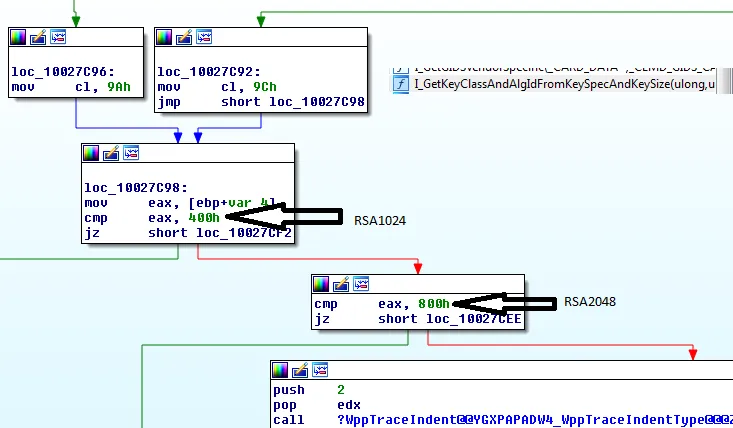
I_GetKeyClassAndAlgIdFromKeySpecAndKeySizeAdmin authentication
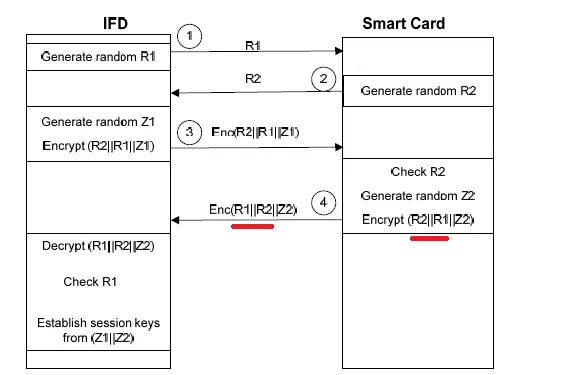
- On Windows 7: only mutual authentication is implemented — challenge size is 40 bytes, using 3DES CBC (not ECB)
- Since Windows 10 (possibly 8): general authentication is also supported — shorter 8-byte challenge
- Inconsistency in step 4 of mutual auth: the order is
R1‖R2‖Z1instead of the documentedR2‖R1‖Z1
Undocumented tags (FCI tag 73, next to 0x40)
0x40: supported authentication protocol (short challenge)0x41(value0x80?) — undocumented0x42(value0x80?): enables read-only mode
These tags are only read when the GIDS version byte in the AID is set to 4. Source: I_GIDS_InitializeVendorSpecific
Key importation
Key import is supported only from Windows 10 onwards.
1 — FCI tag value mismatch
The hardware page incorrectly specifies tag 0x64. Both the GIDS and minidriver specs require tag 0x61. The FCI tag is optional in the SELECT response, but if absent the card is not recognized. Only Windows 10+ checks the FCI data (not Windows 7).
2 — CRYPT_NOHASHOID not handled
The CRYPT_NOHASHOID flag of CryptSignHash (CAPI) is silently ignored — the minidriver sends the same APDU regardless, without returning unsupported. As a result the signature is invalid. Tested on Windows 7 with SHA1, SHA256, and MD5. Note: CALG_SSL3_SHAMD5 works (no OID is sent).
3 — Global public key cache confusion
Public keys are cached cross-process by the Smart Card service via ScardWriteCache / ScardReadCache. If you reformat a card repeatedly with the same serial number but different key pairs, the cached key confuses the driver and causes signature and decryption failures.
4 — No pinpad reader support
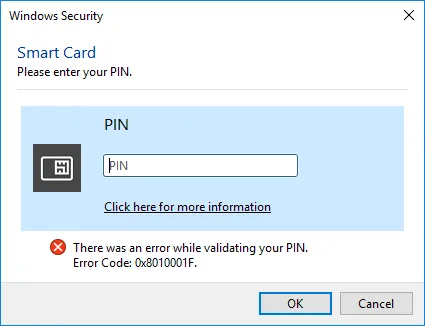
When a pinpad reader is connected, the UI still shows the PIN entry screen instead of using the hardware keypad. With a PIN firewall (e.g. Gemalto Ezio Shield), the card becomes unusable — the APDU returns 64 04, translated to 0x8010001F.
5 — Key import blocked on Windows 7
Even with the Base CSP import policy modified, key import is not supported on Windows 7. Import works correctly on Windows 10.
6 — Big-endian RSA key format
RSA keys are pushed to the card in big-endian format (as on a JavaCard). The minidriver handles the little-endian to big-endian conversion transparently.
7 — No ECC smart card logon (by design)
ECDH is not in the GIDS specification, so ECC keys cannot be used for smart card logon. ECC can only be used for signing (e.g. TLS client authentication).
8 — GET PUBLIC KEY tag mismatch
The documentation specifies tag A3 in the GET DATA command. The minidriver actually issues tag 70:
minidriver:    00 CB 3F FF 0A 70 08 84 01 82 A5 03 7F 49 80 00
documentation: 00 CB 3F FF 0A A3 08 84 01 82 A5 03 7F 49 80 00